
Offers & payments
Swish at checkout and on invoices
Connect your Swish Handel number so buyers can pay with Swish at checkout and invoices mark themselves paid.
With Swish Handel your buyer can choose Swish at checkout. On a phone the Swish app opens, and on a computer she scans a QR code. The money goes straight from her bank to your bank account, without Stripe and without passing through Idun. Your invoices get Pay with Swish and are marked paid automatically once paid.
Connecting takes about ten minutes, once every five years. Swish is Swedish and pays in kronor.
What you need
- Swish Handel from your bank. It is sometimes called Swish for merchants. It is not the same as Swish Företag, the number you print on an invoice.
- A certificate contact. When you sign the agreement, the bank asks who will create the certificate. Swish calls this person the CPOC. It can be you, your bookkeeper or a co-owner, and they sign in with BankID.
- Owner of the workspace. The Swish card under Settings → Payments is shown to the workspace owner.
You get a new Swish number starting with 123. Don’t print it as an ordinary Swish number. Some banks stop payments sent straight to a Handel number. Idun creates the payment for the buyer instead.
1. Create the certificate request
- Go to Settings → Payments → Swish.
- Enter your 123 number and click Create certificate request.
- Click Copy. The text starts with
-----BEGIN CERTIFICATE REQUEST-----.
Is someone else the certificate contact? Click Copy link for the certificate contact and send them the link. It is valid for 14 days, and on the page it opens they do the rest without signing in to Studio.
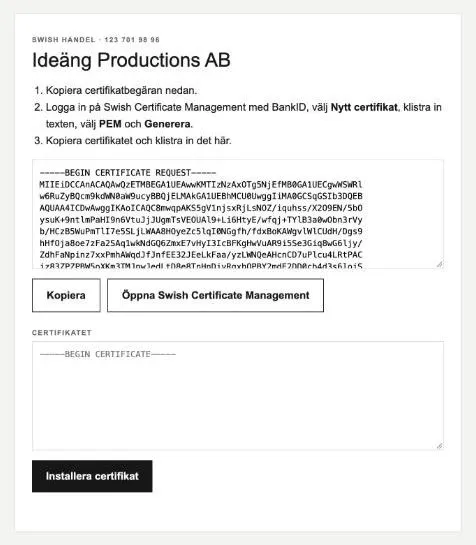
2. Create the certificate at Swish
The portal is in Swedish. The button names are quoted as they appear.
-
Go to portal.swish.nu and sign in with BankID. Your company registration number and your 123 number are on the left. Click Nytt certifikat.
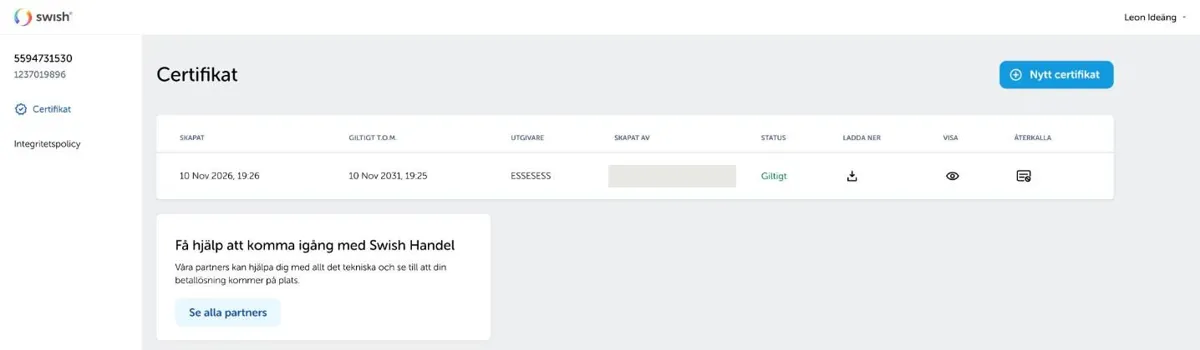
-
Step 1, Förfrågan, explains how to make a CSR file in Keychain Access. You don’t need to do that, because Idun has already made the request. Click Hoppa över (skip) at the top right.
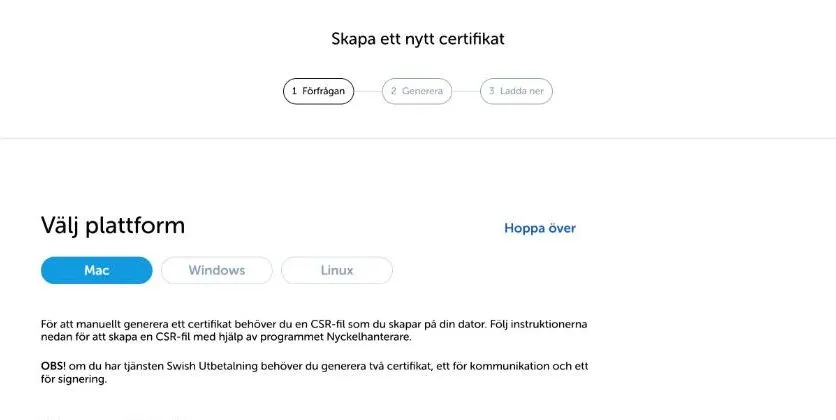
-
In step 2, Generera, paste the text into Eller klistra in från din CSR-fil and click Generera certifikat.
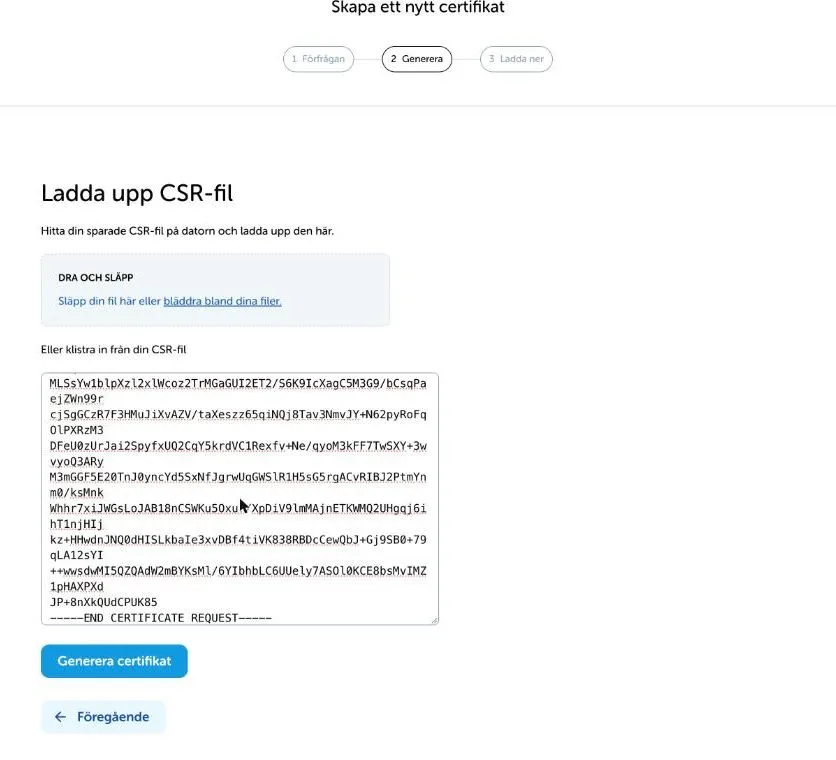
-
In step 3, Ladda ner, it says Ditt certifikat är redo (your certificate is ready). Its status is Giltigt (valid) and it lasts five years. Click Ladda ner certifikat. A file named
swish_certificate_followed by the date lands in your downloads. Click Klar.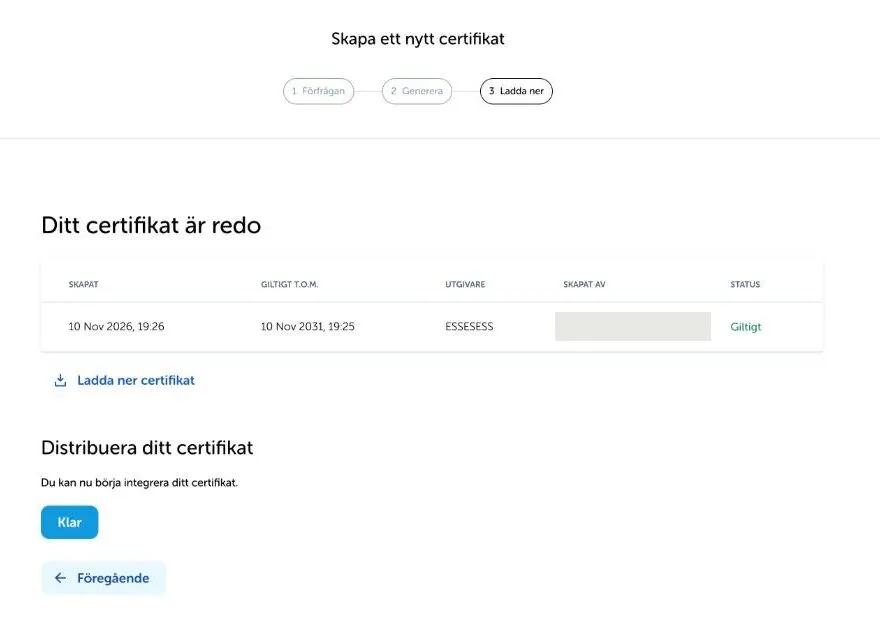
3. Install the certificate
Go back to the Swish card in Studio, or to the link page. Choose the certificate file or paste its contents and click Install certificate.
Idun checks that the certificate belongs to your request, matches your number and is accepted by Swish. Only then is Swish switched on, and the card shows Active.
4. Turn Swish on in your offers
Open the offer and switch on Swish. Swish works for one-time purchases in kronor. Subscriptions and payment plans are paid by card, because they are charged again.
At checkout the buyer chooses between Card and other methods and Swish.
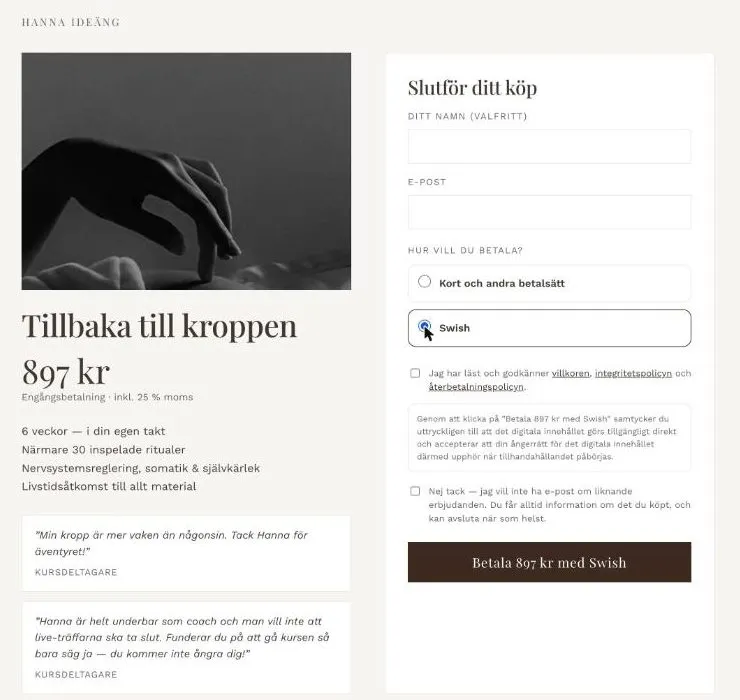
If Swish declines a payment, for example because the buyer has reached her Swish limit, she is told why and can pay by card instead.
Invoices
Once Swish Handel is active, new invoices get Pay with Swish: a QR code in the PDF, and a button in the invoice email and the reminders. The buyer reaches a payment page for that invoice and pays with Swish, and the invoice marks itself paid. If the invoice belongs to an offer, access opens at the same time. You get a notification for every paid invoice.
Invoices you have already sent keep their old Swish QR. Once they are paid you can remove your Swish Företag number under Settings → Invoicing.
Refunds
Open the order and click Refund. The money goes back to the buyer by Swish from your 123 number, usually within seconds. The buyer gets an email about the refund.
Renewing the certificate
The certificate lasts five years, and the date is on the Swish card. Click Renew certificate in good time and repeat steps 2 and 3. The old certificate keeps working until the new one is installed.
If something goes wrong
- I can’t get into portal.swish.nu: the bank has not registered you as the certificate contact. Ask the bank to add you to the agreement for your 123 number.
- “The certificate does not belong to the latest request”: you made a new request after creating the certificate. Create a new certificate in the portal from the latest request.
- “Swish does not accept the certificate yet”: check that it is for the right 123 number and try again shortly.
- Swish doesn’t show at checkout: check that the Swish card says Active, that the offer has Swish on, and that it is a one-time purchase in kronor.